Requests
Every request complete before you estimate.
An RFQ rarely arrives as one file. Blake pairs model and drawing per part and adds quantities and revision. You start estimating from a complete job file.
- SDX-MFG-001_Rev-J.pdf
- SDX-MFG-001_Rev-J.step
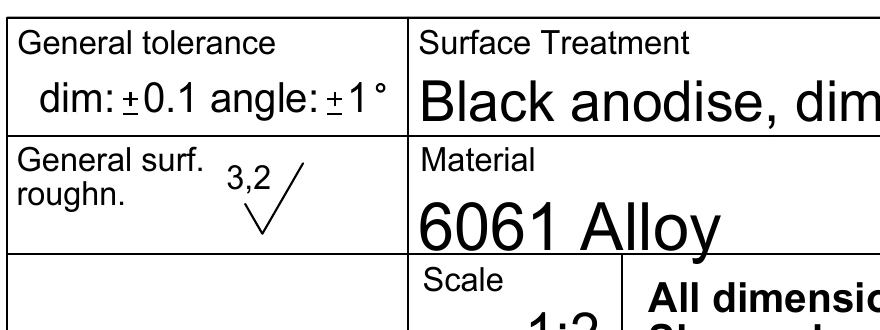
Read from the drawingTo check
- Material
- 6061 Alloy
- Finishing
- Black anodise, dim. stable
- General tolerance
- ±0.1 mm, angle ±1°
- Surface roughness
- Ra 3.2 general
At a glance
A complete job file
Model, drawing, quantity and revision on the right part.
Requirements to confirm
Values read as proposals; you confirm or correct them.
Revisions with history
Every revision is kept, with its own files.
Step 1
One job file per part
Upload every file of a request in one go. Blake pairs each STEP model with the right PDF drawing, and you check the pairing before anyone starts estimating.
If a drawing is missing or a pairing is in doubt, it stays open on the part until you decide, so you find out straight away rather than halfway through the estimate. Each line of the request keeps its own quantities.
- ModelSDX-MFG-001_Rev-J.step
- DrawingSDX-MFG-001_Rev-J.pdf
- Quantities10, 25, 50
- RevisionJ
Without a model or drawing, that slot stays open.
Step 2
Every requirement on the drawing starts as a proposal
Material, general tolerance, surface roughness and finishing are read from the drawing and set beside the drawing and the model. You confirm what is right and correct what is not; who changed what, and when, stays on record, with a note if you add one.
Roughness and finishing are two different requirements. Ra 3.2 general is about the machining; black anodising becomes its own outsourced line in the estimate, with its own price.
- Material
6061 AlloyEN AW-6061CorrectedNote: Standard grade name from our catalogue - FinishingBlack anodise, dim. stableConfirmed
- General tolerance±0.1 mm, angle ±1°Confirmed
- Surface roughnessRa 3.2 generalTo check
Step 3
Revisions are kept side by side
A new revision never overwrites the old one. Rev H is kept with its own files, right beside Rev J.
Whoever picks up the part later can see where a value came from and who confirmed or changed it.
- Rev HKeptIts own files and history
- Rev JCurrentBasis for the estimate
Every revision keeps its own files.
Who it is for
Four roles work from the same request.
Frequently asked questions
Is your question not here? Talk to sales
Which files can I use for a request?
STEP models and PDF drawings. Upload them in one go; Blake pairs model and drawing per part by file name. If a pairing is uncertain, you get a question rather than a guess.
Can one request hold several parts?
Yes. Every part keeps its own files, quantity and revision.
Which requirements are read from the drawing?
Material, general tolerance, surface roughness, finishing and threads. They sit as proposals beside drawing and model; you confirm or change them.
What happens when the customer sends a new revision?
The new revision sits next to the previous one, which is kept with its own files.
Can we share drawings under an NDA?
Yes. We agree confidentiality before you share drawings.
Quote faster with AI, and set the price yourself
Category: Guides7 min read
What belongs in a complete request for quote?
Category: Know-how8 min read
Software-driven machining starts at the request
Category: Research6 min read
See a request in Blake.
In a demo you see how a STEP and a PDF become one complete request.